
스팀 최근 평가
없음
스팀 모든 평가
스팀앱 평가
게임 번호
786520
출시일
2018년 3월 15일
개발
Joshua Chen
유통
Studio GPBeta
언어
영어, 일본어, 중국어 간체, 중국어 번체
웹사이트 방문
플랫폼
카테고리
2. 가격 (KRW)
갱신:
2년 전
원가:
₩ 4,400
세일:
-
판매가:
₩ 4,400
6. 게임 소개
6.1 동영상
6.2 소개
스페셜 에디션

This store page is selling the donation version of SAO Utils.
You could enjoy the features such as workshop and self update provided by Steam.
If you are new to this software, please give it a try the beta version without any limitations,
and decide whether is worth donating this project.
This software may be NOT friendly to some novices.
On the opposite, you could customize any parts of the launcher menu and desktop widgets.
It's NOT a system theme tool, and will NOT provide any wallpapers.
This project is still under development, any ideas are welcome to Discussions.
This is neither release nor final version.
Final release is likely to be done a year later, and free to play on new store page of Steam.
소프트웨어에 대하여
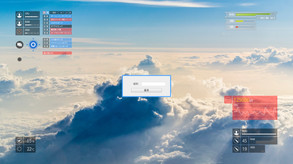
SAO Utils provides you a customizable Full-Dive 3D app launcher with varieties of themes, desktop widgets and powerful utilities.In built-in stereo mode, you can even browse multiple web pages in the same time inside the cool launcher virtual space with stereo displays.
Its pluggable architecture allows you, the developer, to add any kinds of plug-ins to the core program.
Features
- Slide to Launch
Anywhere and whenever, holds mouse LMB and RMB, or holds two fingers on tablet, slide down to call out the launcher. - Arrange as You like
Right click to edit any items, drag to arrange them. You can also d'n'd files from the external File Explorer. - Desktop Widgets
Decorate desktop with your favorite images, web pages, animation, notes...varieties system and custom status. - Stereo Mode
Browse web pages and images with stereo display devices.
Built-in stereo supports for launcher:- Side by Side (Squeezed)
- Side by Side (Cropped)
- Side by Side (Black Bars)
- Anaglyph
- In "Preference" - "Graphics" - "Stereo" config panel, select a stereo mode and save.
- Hold RMB and drag on launcher background to zoom the viewport.
- Hold RMB and drag on built-in browser to adjust distance of web pages.
- Side by Side (Squeezed)
Configuration Migration
- If you are migrating configurations from another version, select the "Launch Configuration Tool" from Steam launch option.
- Steam Cloud is supported, synchronizing your settings and launcher menu anywhere.
Workshop
- Find more Icons, Sound FXs, Themes and cool staffs in SAO Utils Workshop.
7. 도전과제
 히든 도전과제 완료방법 (english)

Beta Tester
Welcome to The SAO Utilities!

Aincrad Workshop
Welcome to Lisbeth's Smith Shop!

SAO Survivor
This is a game, but it's not just something you play.